

Layout
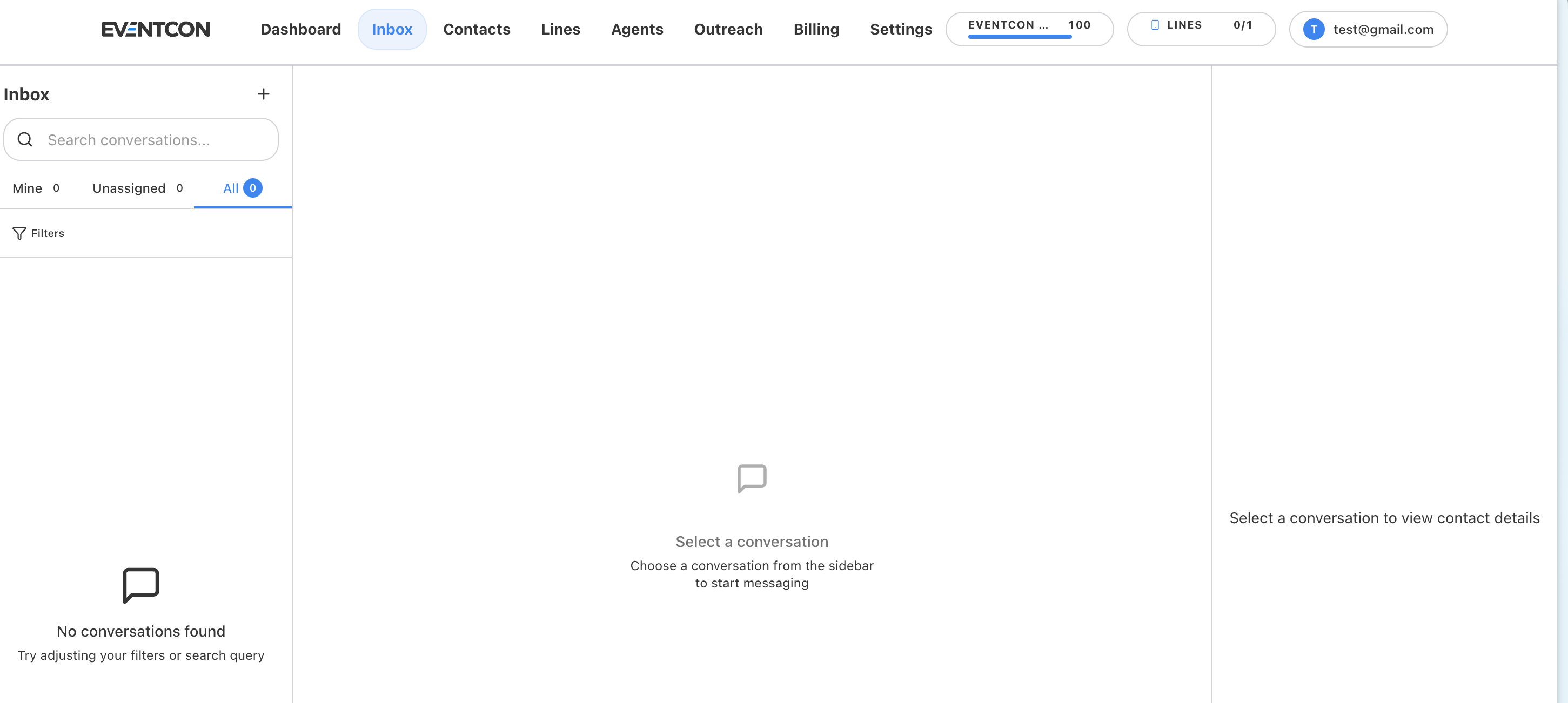
The Inbox has three panels:- Conversation list (left). Search, tabs, and filters to find a thread.
- Conversation (center). The full message history with this person, and where you type a reply.
- Contact details (right). Who you’re talking to.
Find conversations
- Search: type into Search conversations… to find a person or a message.
-
Tabs: split work across a team.
The number next to each tab shows how many conversations it holds.
- Filters: narrow the list further, for example by line.
Start a new conversation
Click + next to the Inbox heading, choose a contact, and send your first message.Step in on an AI conversation
Your agent keeps conversations moving, but some moments need a human. Examples include a VIP buyer, a group or sponsorship request, an upset attendee, or a question the agent can’t answer.1
Open the thread
Find the conversation using search or the All tab.
2
Read the history
Read what the agent has already said so your reply picks up naturally.
3
Reply
Type your message in the conversation panel and send it. It goes out from the same line, so the contact sees one continuous conversation.
Working as a team
- Check Unassigned regularly and pick up threads that need a person.
- Use Mine as your personal to-do list.
- Agree on a rule for when people step in, for example “any lead asking about group tickets goes to Dave.”